FAQ State budget 2026

What You Need to Know

What did the 2026-27 state budget provide for child care and early education?

The $ 7.5 B allocated in the 2026–27 California State Budget highlights the state’s Commitment to supporting child care and early education, underscoring the vital role providers play in shaping the future of children and families.


The budget includes funding for family child care providers (licensed and family, friend, and neighbor care), centers, and all other early education and care other than TK. The funding includes voucher-based child care, direct-contract providers, the California State Preschool Program, and federal matching programs.

Does the budget include new child care slots?

Yes. The budget adds funding for 20,700 new Alternative Payment Program voucher slots and 2,070 contracted slots, with priority for ages 0-3, as part of the goal to reach 200,000 spaces overall. This is a portion of, but not all, the spaces committed to expanding access.

The final budget also rejected a proposal from May that would have eliminated 6,798 currently active and funded child care spaces.

Also, new guidance for how to redeploy unused spaces funding to other parts of the state to ensure as much utilization as possible of this funding for families and providers.

The budget includes approximately:

  • $1.1 billion from the federal Child Care and Development Fund.
  • $329 million through Temporary Assistance for Needy Families.

Despite our successful court challenge to preserve these funds after federal attempts to freeze them, federal funding remains a critical supplement to state investments in subsidized child care and early education programs.

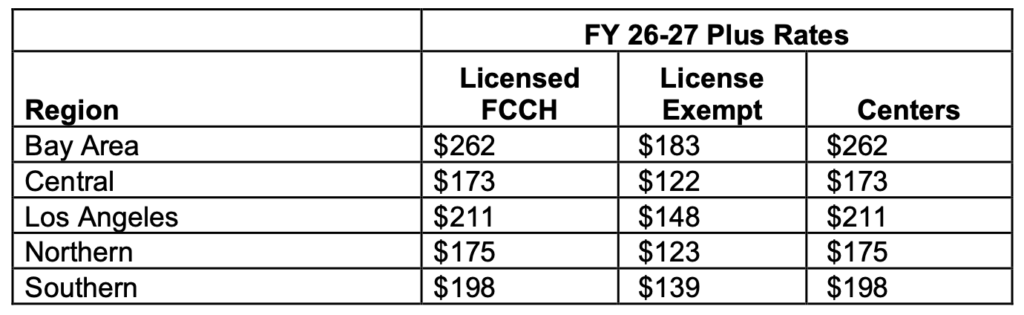
Yes. Providers will receive a 2.01% rate adjustment: Effective for July pay for June work. Date to receive is TBD, and will be retroactive. CCPU is continuing to organize to get both out in a timely manner and to win more.

The new funding will be paid directly to providers as a monthly, per-child rate supplement increase. Providers should receive additional information about implementation and payment procedures from the appropriate state or local agency soon, so staying alert to updates is essential.

Yes, the work that CCPU providers organized to secure these grants is reflected in this budget, which includes $11.5 million in one-time Proposition 64 funding for the Child Care Infrastructure Grant Program.

The grants will prioritize facilities recovering from:

  • Natural disasters.
  • Wildfires
  • Other declared disasters.
 

The budget also includes an additional $200,000 for Families, Friends, and Neighbors providers. This funding was added through the August Trailer bill.

Approximately $25.6 million in one-time federal relief funding will be distributed to child care operators affected by severe regional disruptions in 2023-24.

Providers should watch for information about eligibility, applications, and distribution through the relevant state or local administering agency.

The trailer bill includes several provisions affecting child care providers:

  • Updates to the 80/20 rule to provide more flexibility: measured over a month, not a day; permits a process to receive waivers to this rule; and improves interpretation for multiple providers on a license. In August, we successfully organized to eliminate the most onerous reporting requirements.
  • Provides exemption so that providers don’t have to acquire costly new documentation that may not be available in certain areas.

  • Clarifies process when families who haven’t been in care and don’t have excused absences over extended periods of time.

Additional guidance may be issued following meetings and/or bargaining with the state regarding implementation, clarification of requirements, and the potential impacts of these provisions.

AB 1981, authored by Assemblymember Cecilia Aguiar-Curry, would finalize the Child Care Providers United Cost-of-Care Rate Reform.

The legislation is intended to establish the next phase of California’s rate reform system and improve how reimbursement rates reflect the cost of providing care.

CCPU providers organized against proposed federal Head Start cuts and protect critical early care and education funding for children and families. Through this advocacy, funding was preserved for Head Start programs, including support that reaches Family Child Care providers who play an essential role in delivering Head Start services and expanding access to high-quality early learning opportunities.

Providers should:

  • Join the union get active! As we organize around the implementation and fight for more, we must also mobilize and make our voices heard through our vote in the upcoming mid-term elections. 

  • Watch for official guidance about the 2.01% rate adjustment and monthly supplements.

  • Monitor announcements about infrastructure and emergency relief grants.

  • Review information about new Alternative Payment Program slots.

  • Follow updates on AB 1981 and the implementation of Cost-of-Care Rate Reform.

  • Keep records of and report facility damage or regional disruptions in case they qualify for grant or relief funding.

Password Reset

Step 1

Go to portal site.

STEP 2

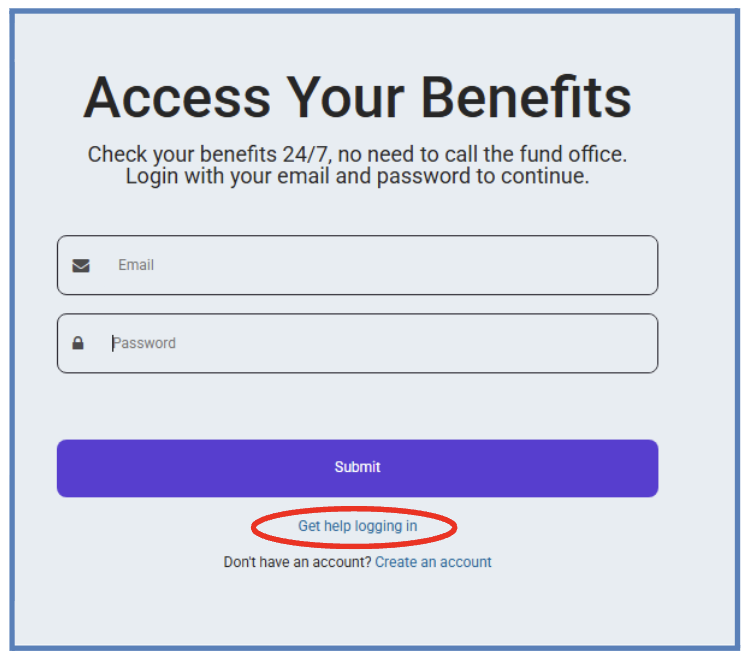
Click “Get help logging in”

step 3

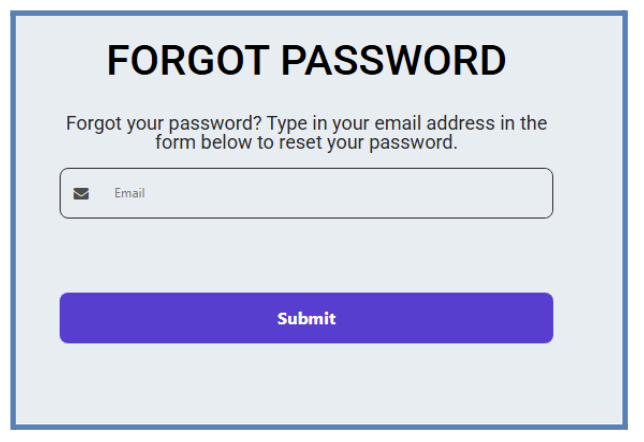
Enter your email, then click “Submit” button

step 4

Check your email

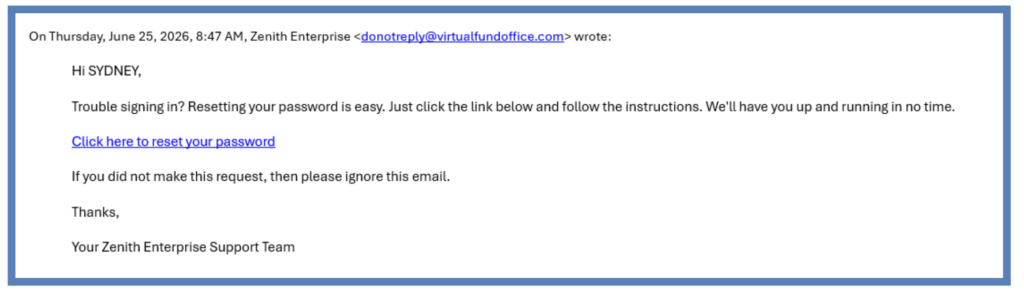
Check the email address you entered for an email from Zenith Enterprise, then click “Click here to reset your password.”

step 5

Retrieve your verification code

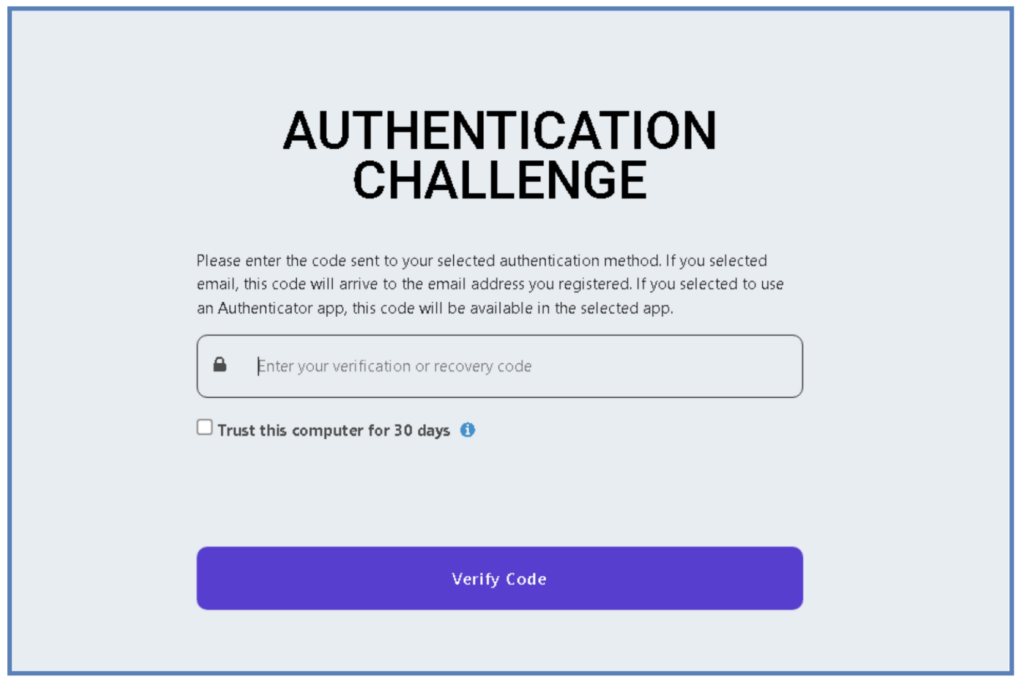
This Authentication Challenge screen will appear. Return to your email to retrieve the verification code, enter the code on this screen, then click “Verify Code.”

step 6

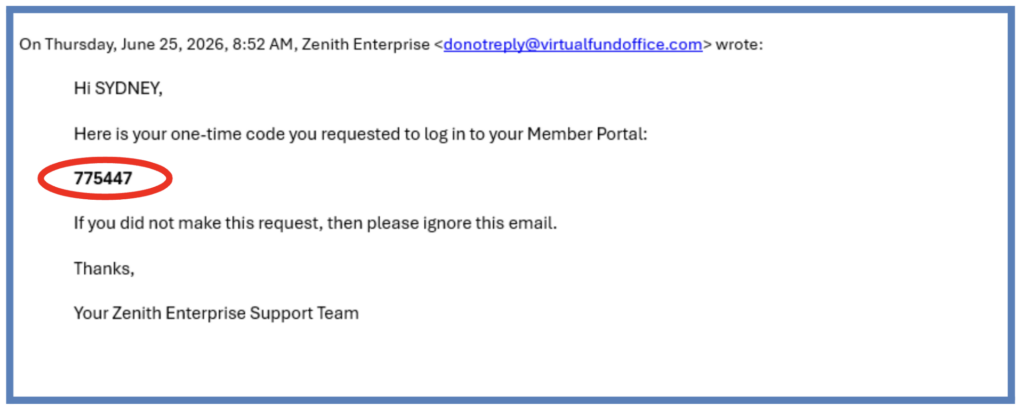
Copy the code sent to your email address.

step 7

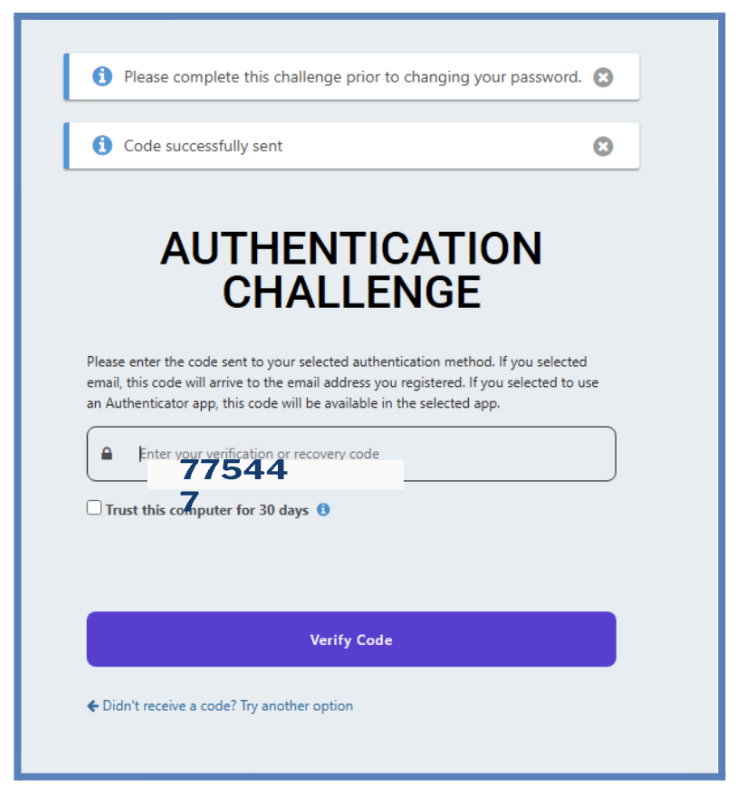
Paste the code that you copied from your email address into the “Verification code” field and then click the “Verify code” button.

If you have any questions, or would like assistance registering your portal, call our CCPU Provider Resource Center at (888) 583-CCPU (2278) or PRC@ccpuca.org.

Accessing the Provider Portal

Step 1

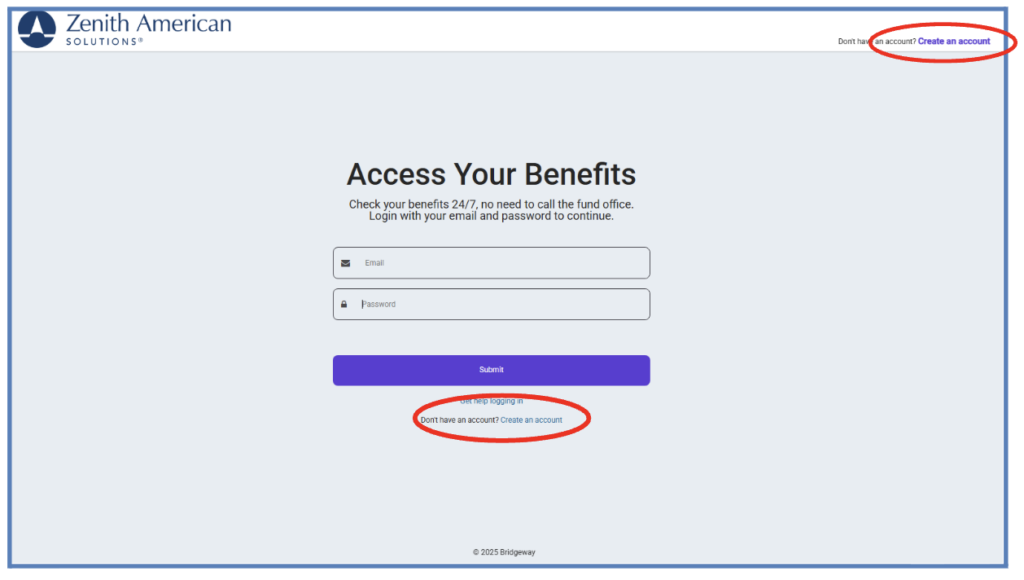
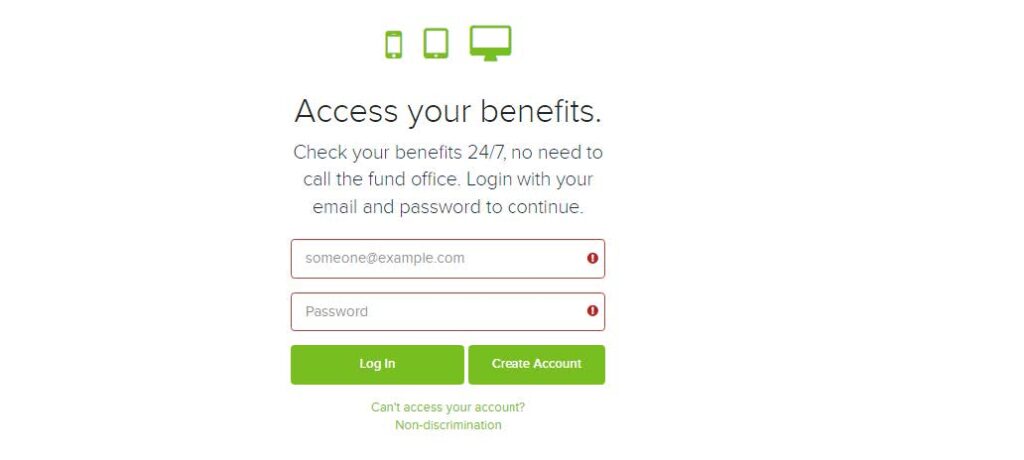
Go to portal site.

STEP 2

Click “Create Account.”

step 3

Enter Your Information

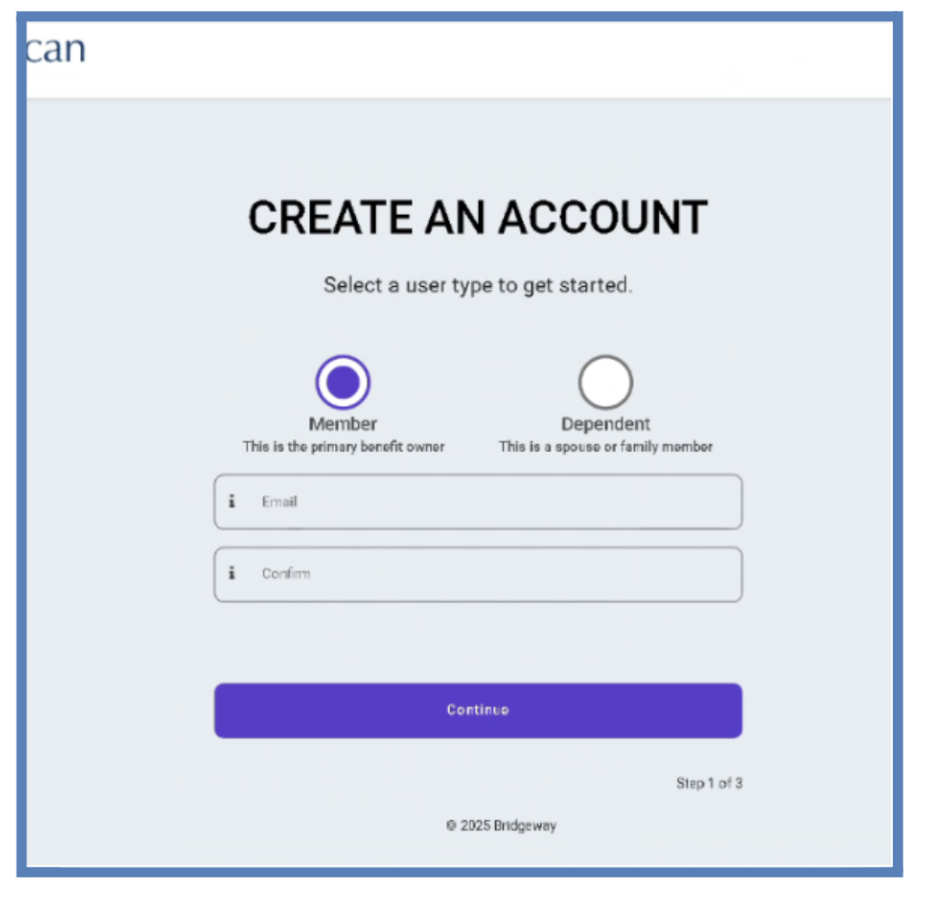
Select if you are a Member or a Dependent. Enter your preferred email address and confirm your email address. When finished, click “Continue” Note: It is important that you enter your email in all lowercase.

step 4

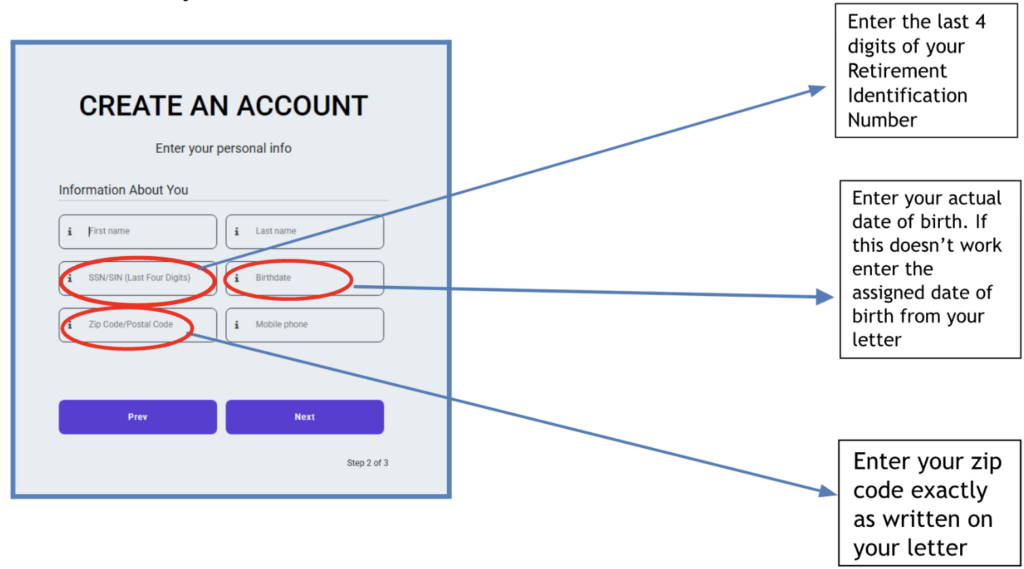
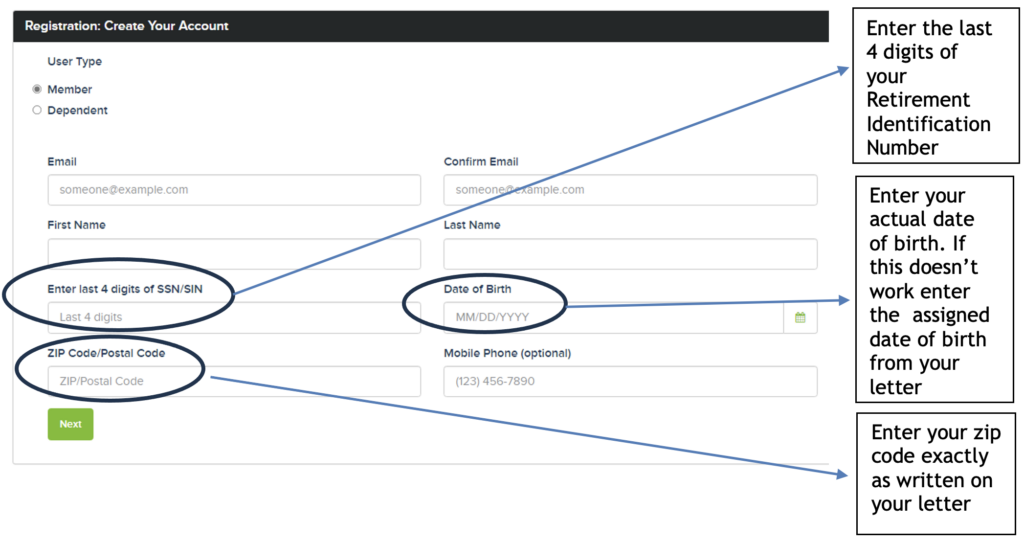
Complete the following fields, using the information provided in the benefits letter you received.

  • First and Last Name:  Enter your first and last name.
  • SSN/SIN:  Enter the last 4 digits of the Retirement Identification Number you received from your benefits letter.  Do not enter the last 4 digits of your Social Security Number, unless you have already received a distribution.
  • Date of Birth:  Enter your actual date of birth.  If this doesn’t work, then enter the temporary date of birth from your benefits letter. 
  • Zip Code/Postal Code:  Enter the zip code exactly as written on your benefits letter.
  • Mobile Phone: Enter your cell phone number.
step 5

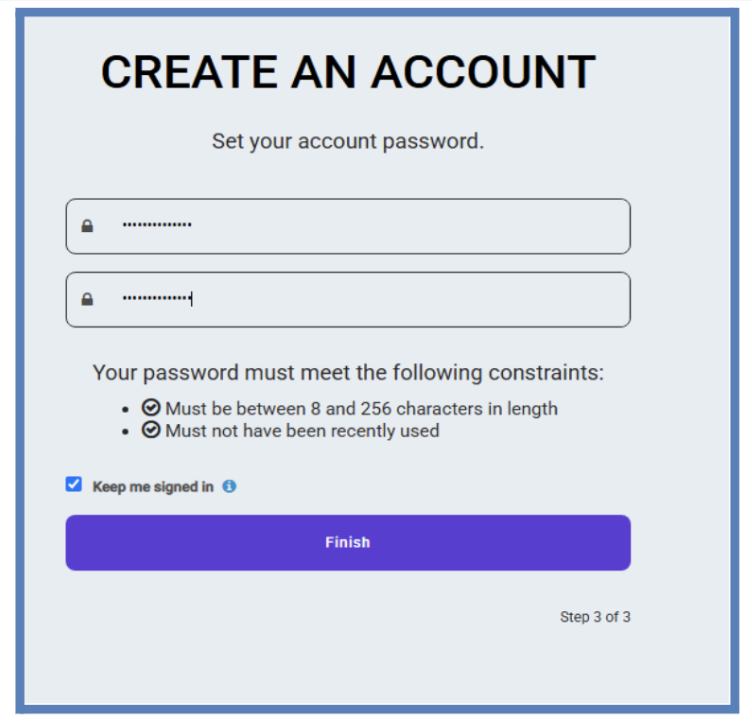
Click “Next” and the following screen displays:

Enter a password that follows the constraints shown underneath the fields so that it can be accepted, and confirm the new password in the second field.

step 6

Click Finish

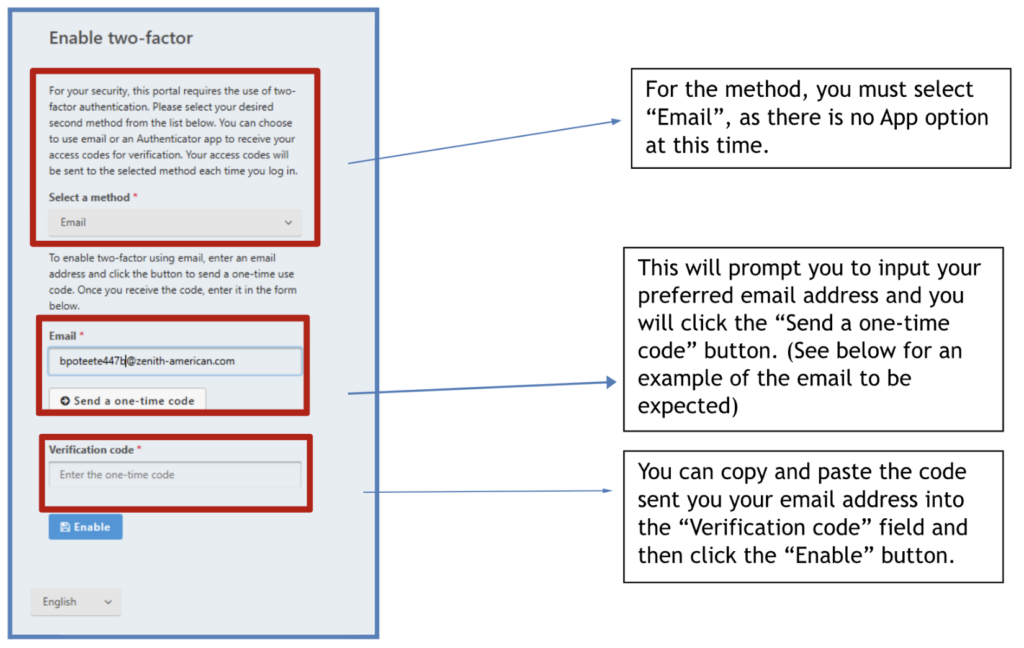
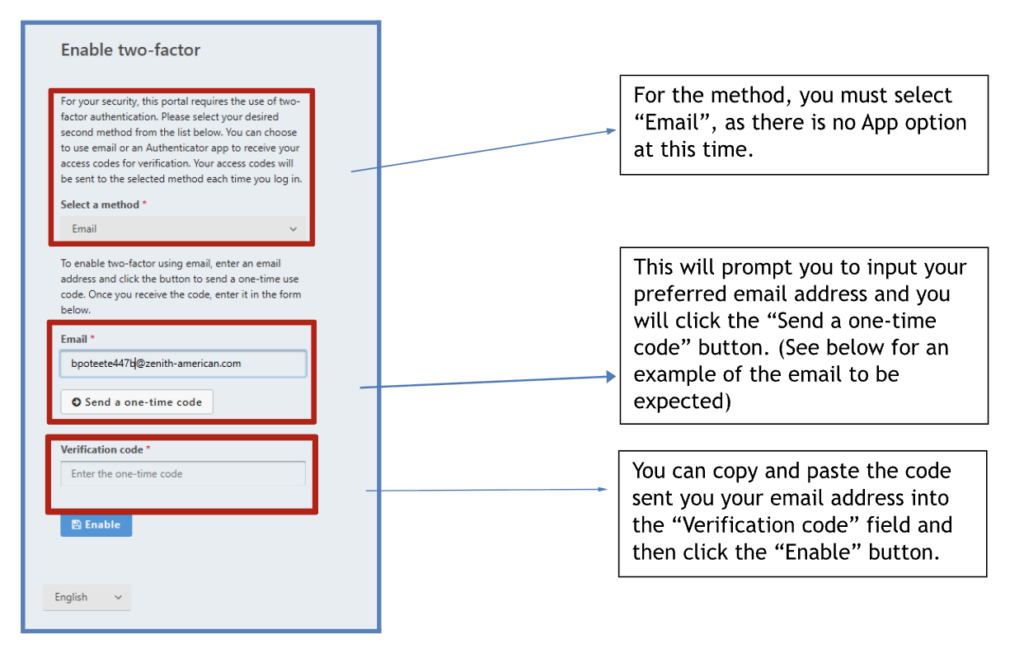
In order to complete account setup, you will need to enable Two-Factor Authentication.

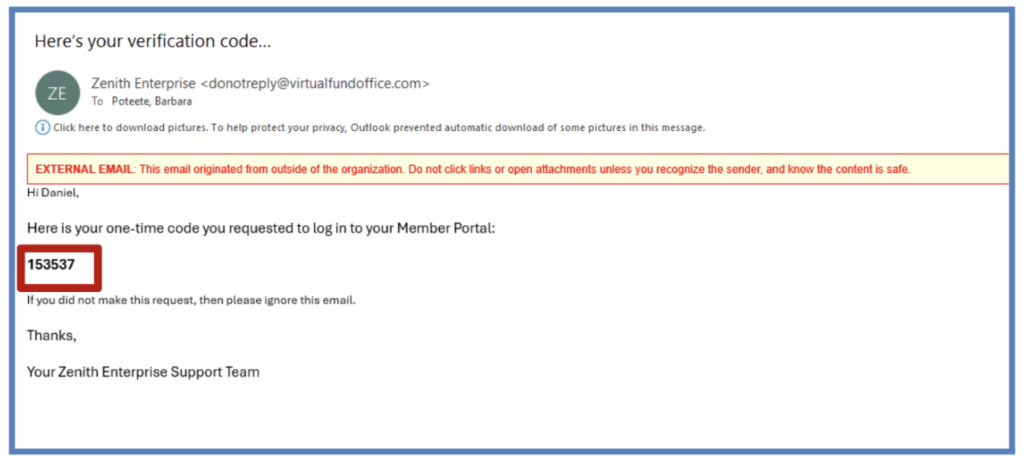
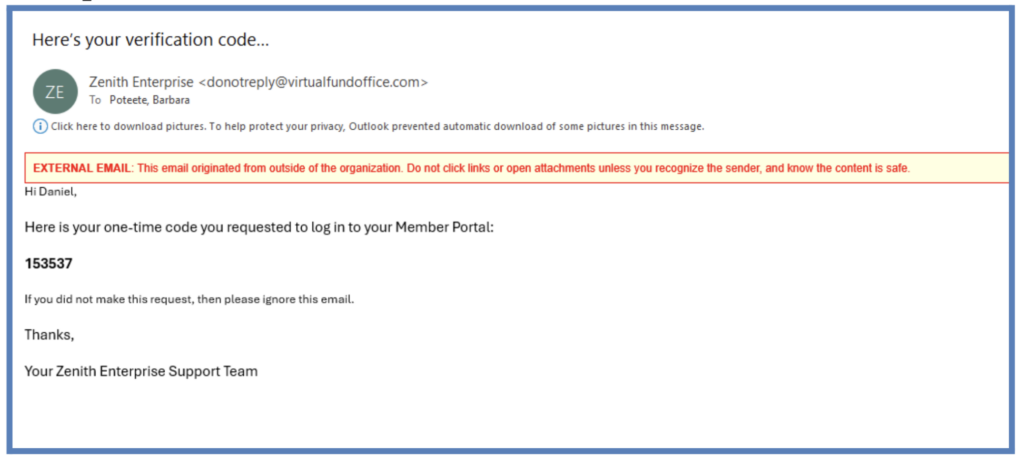
The one-time code referenced above will be sent to the email address you entered. You will check your email to locate the code provided to be entered as stated above. An example is shown below.

step 7

Save Your Recovery Codes

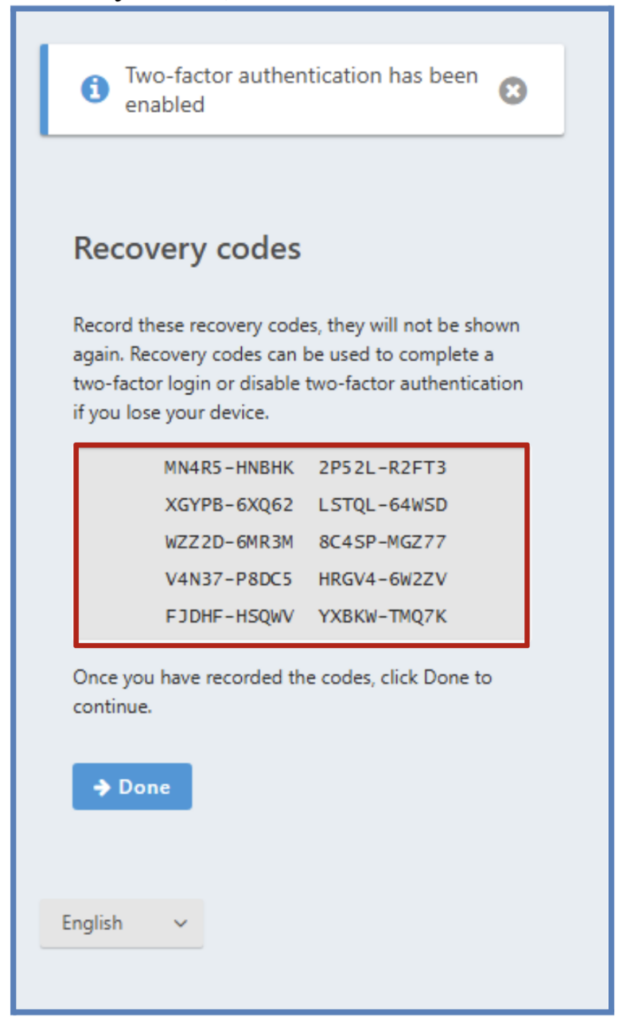
Upon completing two-factor authentication setup, you will be shown a list of recovery codes that can be used to complete a two-factor login or disable two-factor authentication if you lose your device. It is important that you either screenshot or write down these codes as they will not be provided a second time. Once you have recorded the recovery codes, click the “Done” button.

Note: The above screenshot is an example only. The recovery codes are unique to each Provider.

Step 8

From the initial screen, enter the email address you used to set up your account and password, and click Submit. You will then be asked to complete the process of authentication that you had set-up in Step 6 above.

Step 9

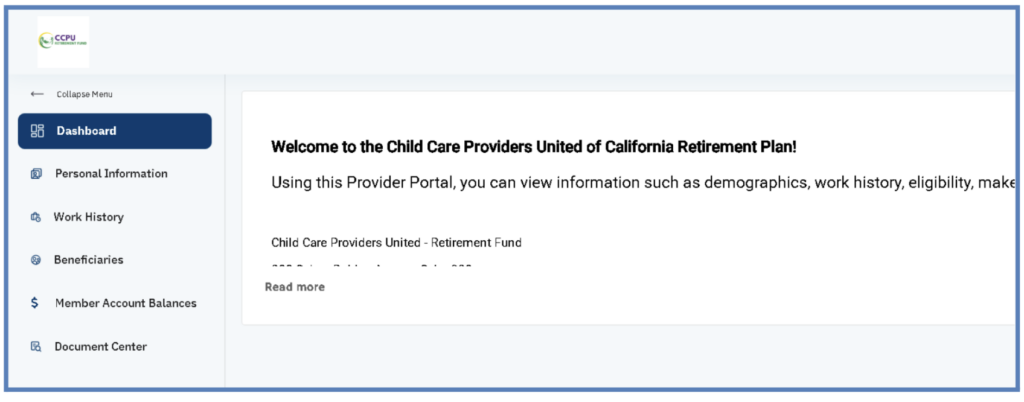
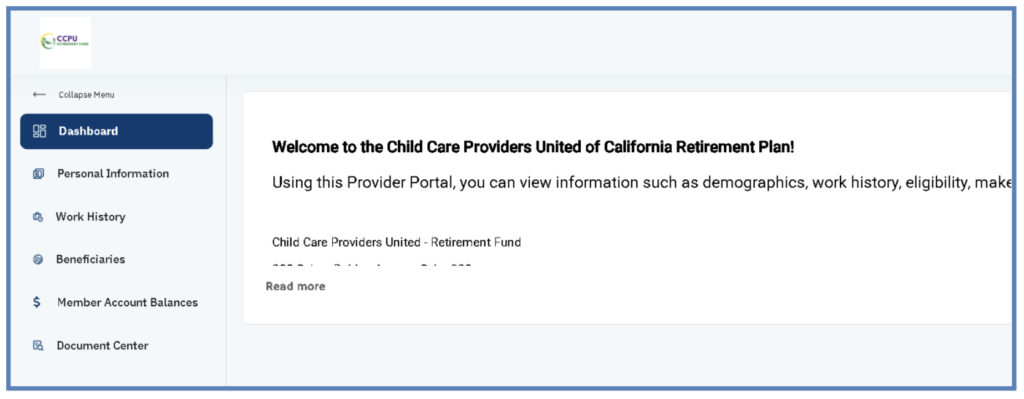
After entering your code, click the “Verify Code” button. You will then be redirected to the Dashboard screen.

If you have any questions, or would like assistance registering your portal, call our CCPU Provider Resource Center at (888) 583-CCPU (2278) or PRC@ccpuca.org.

Two-Factor Authentication

Step 1

Go to portal site.

STEP 2

After creating an account, you will need to enable Two-Factor Authentication.

The one-time code referenced above will be sent to the email address you entered. You will check your email to locate the code provided to be entered as stated above. An example is shown below.

step 3

Step 3: Upon completing two-factor authentication setup, you will be shown a list of recovery codes.

These can be used to complete a two-factor login or disable two-factor authentication if you lose your device. It is important that you either screenshot or write down these codes as they will not be provided a second time. Once you have recorded the recovery codes, click the “Done” button.

Note: The above screenshot is an example only. The recovery codes are unique to each provider.

step 4

Enter Your Email Address

From the initial screen, enter the email address you used to set up your account and password, and click Submit. You will then be asked to complete the process of authentication that you had set-up in Step 6 above.

step 5

Click "Verify Code"

After entering your code, click the “Verify Code” button. You will then be redirected to the Dashboard screen.

If you have any questions, or would like assistance registering your portal, call our CCPU Provider Resource Center at (888) 583-CCPU (2278) or PRC@ccpuca.org.

Access your portal

Step 1

Go to portal site.

STEP 2

Click “Create Account.”

step 3

Complete the following fields, using the information provided in the benefits letter you received.

  • User Type: Member
  • Email: Enter your email address and confirm your email
  • First and Last Name: Enter your first and last name
  • SSN/SIN: Enter the last 4 digits of the Retirement Identification Number you received from your benefits letter. Do not enter the last 4 digits of your Social Security number.
  • Date of Birth: Enter your actual date of birth. If this doesn’t work, then enter the temporary date of birth from your benefits letter.
  • Zip Code/Postal Code: Enter the zip code exactly as written on your benefits letter
step 4

Click “Next” and the following screen displays

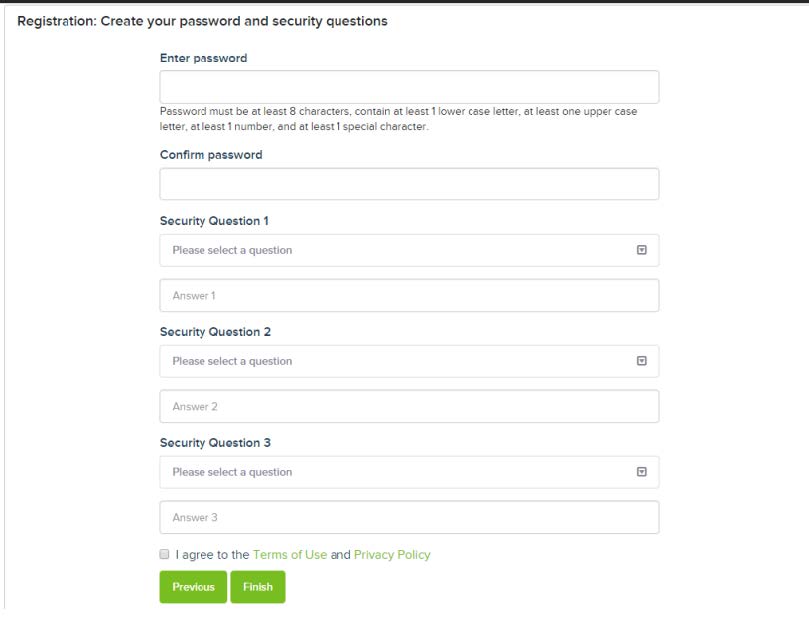
Enter the password, and three Security Questions and answers, and select the Terms of Use and Privacy Policy checkbox.

step 5

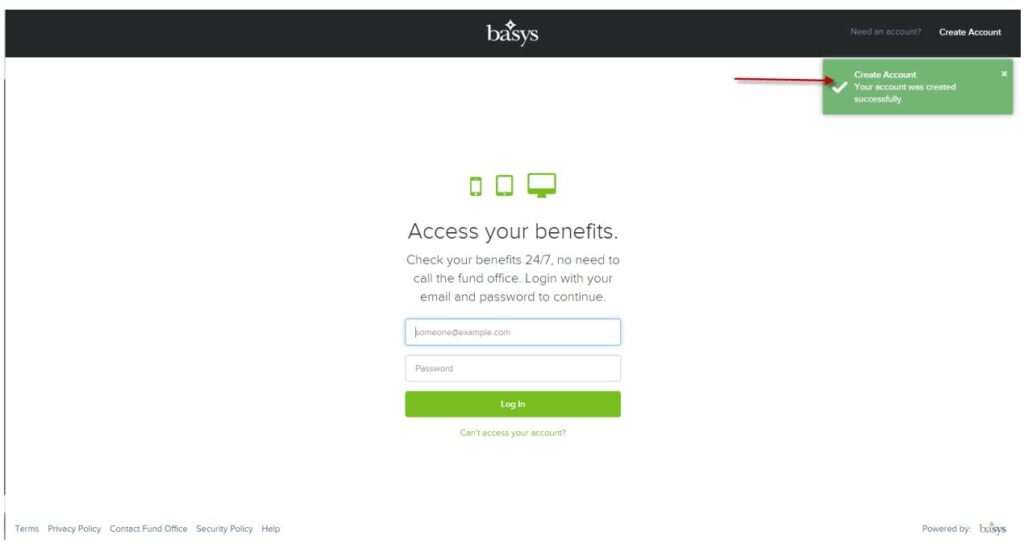
Click Finish, the account is created, and you are returned to the initial screen (see following screen example)

You will also receive an access code which will be sent to the email that you entered when you created your account. Note: Each time you log in from a new computer/device, you must enter a new access code.

step 6

From the initial screen, enter the email address you used to set up your account and password, and click Login

step 7

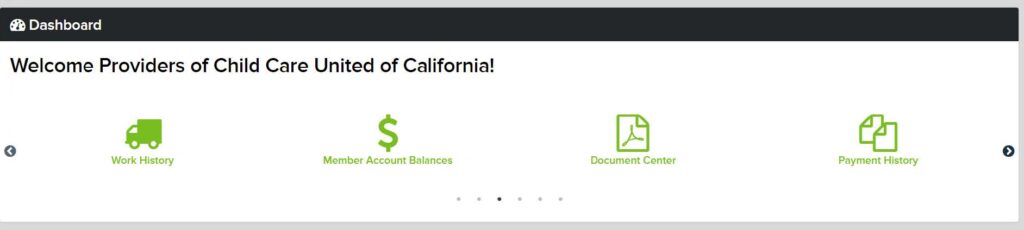
Enter the access code you received in your email to access the Dashboard screen

If you have any questions, or would like assistance registering your portal, call our CCPU Provider Resource Center at (888) 583-CCPU (2278) or PRC@ccpuca.org.

Info Sessions Recordings:

July 9 CCPU Retirement Fund Info Session

July 18 CCPU Retirement Fund Info Session

Frequently Asked Questions

Find answers to common questions in the FAQ section below.

Are the benefits from the Retirement Plan taxable income to me?

The State contributions to your Retirement Plan account are not taxable to you until you receive a distribution. There may be distributions options to defer those taxes.

When can I sign up for the Retirement Fund and where can I learn more?

Eligible providers are automatically enrolled in the retirement fund. However, the administrator, Zenith American Solutions, will ask eligible providers to update necessary information. It is important to provide this information so that your records are accurate, and to avoid delays accessing your account.


If you believe you are eligible, but have not received this mail, you may contact the CCPU Provider Resource Center for assistance at (888) 583-CCPU (2278) or PRC@ccpuca.org.

Have more questions?

If you have additional questions, you can call the CCPU Provider Resource Center at 888-583-CCPU (2278) from 9am to 5pm Monday-Friday or email at PRC@ccpuca.org.

WHAT – What benefits does the Retirement Fund expect to offer providers?

Expand the Retirement Fund Benefits Table to see benefits.

 Plan Rules
Eligible participants*

You are eligible to participate in the Retirement Plan for a 2024 contribution if you are:

  • A licensed child care provider
  • Who has been paid 6 or more months of child subsidy in the 2023 calendar year (can be non-consecutive months).
Eligibility for benefit credit for contributions in 2024*You will earn your full service credits for 2023 if you were paid for ten or more months of child subsidy in 2023. If you were paid for 6 or more months of child subsidy, you will receive 60% of your service credits, 70% for 7 months, 80% for 8 months and 90% for 9 months. You will not earn any service credit if you were paid for less than 6 months.
ContributionsThe only contributions to the Retirement Plan will be paid from funding won through the CCPU collective bargaining agreement. The Plan does not accept contributions from you.
Amount of annual employer contributions for 2024 service allocable to participants in 2025*You will earn one full service credit for the State contribution on your behalf in 2025 if you were paid for ten or more months of child subsidy in 2024. If you were paid for 6 to 9 months in 2024, you will receive a pro-rated service credit. You will not earn any service credit if you were paid for less than 6 months in 2024.
VestingYou are “vested” in any contribution correctly made to your account. You do not need to work a minimum number of years before 2024 to be entitled to a benefit.
Distribution events

You can elect to receive your account when:

  • You stop all work as a licensed provider paid for state subsidized child care for 9 consecutive months at any age (“terminate from service”);
  • You stop all work as a licensed provider paid for state subsidized child care for 3 consecutive months at age 60 or older (“retirement”); or
  • You attain age 73, which is the age you are required to start receiving payments, unless you are still working.
Forms of distributions

If you are age 60 or older and stop all work as a licensed provider for 3 consecutive months and elect to retire, you can choose to receive your account balance as:

  • One lump-sum payment
  • Approximately equal monthly payments for 5 years
  • Approximately equal monthly payments for 10 years

If you are younger than age 60 and stop all work as a licensed provider for 9 consecutive months, you can only elect to receive your account as one lump-sum payment.

Death benefitsSince your account is 100% vested, you can designate a beneficiary (or multiple beneficiaries) to receive your account balance if you die before you receive it.
InvestmentsThe Board of Trustees will manage how the Retirement Plan is invested on your behalf, with the assistance of investment professionals.

*Special rules apply to providers where more than one provider is on the payment record.

who

Who is eligible for the Retirement Fund benefits?

State contributions to the Retirement Plan are tied to the child care subsidy program. To be eligible for retirement benefits in 2024, you must be a licensed provider who has have been paid for work with a subsidized child in at least 6 months in 2023-these months do not need to be consecutive. License exempt providers are not eligible; however, if you become licensed in a year, your work in that year may count for eligibility.

when

When will the benefits be available?

Contributions to the Retirement Plan are tied to the child care subsidy program. To be eligible for retirement benefits in 2024, you must be a licensed provider who has have been paid for work with a subsidized child in at least 6 months in 2023-these months do not need to be consecutive. License exempt providers are not eligible; however, if you become licensed in a year, your work in that year may count for eligibility.

how

How can I get help enrolling?

If you are eligible, the Plan will automatically enroll you based on data received by the State of California. You should immediately update your information with the Plan so it has has all of your current information and you receive credit for your years of licensed work.